Social Media Tips for Older Adults
With recent studies showing the negative effects that social media has on younger adults, many have chosen to go offline or decrease their time on these platforms. But for older adults, social media remains a vital source of connection.
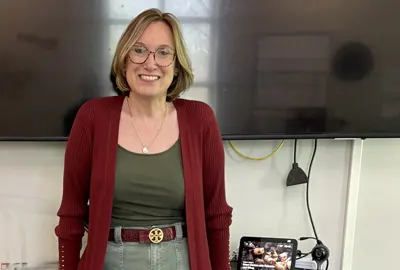
We recently reached out to Melanie Waxman and the team at The Edward A. Myerberg Center. Myerberg, a program of CHAI, is part of The Associated’s Agewell Baltimore, offering programming to inspire healthy aging for older adults. Melanie is the Myerberg’s Tech-Knowledge Hub Coordinator and has provided tips and guidance on navigating social media for older adults.
Social media often gets mixed reactions from older adults—and understandably so. Many of the people I work with are what I describe as technological immigrants living in a world of technological natives. They did not grow up speaking the language of technology, yet they are expected to navigate it fluently.
In my work at the Myerberg Center, I focus on helping older adults make informed, confident choices about social media, while honoring the reality that they are learning this in the second half of life. The goal isn’t to force fluency, but to build understanding, comfort and agency—so technology feels like a tool they can choose to use, rather than a world they’re expected to keep up with.
At its best, social media helps older adults stay connected, informed and engaged. For many people I work with, the biggest benefit is reducing isolation—seeing photos of grandchildren, keeping up with friends who live far away or maintaining a sense of community even when mobility is limited.
Social media can also support curiosity and lifelong learning. I often remind people that social media isn’t about joining every platform—it’s about choosing what genuinely adds value to your life. When used intentionally, it can support emotional well‑being and connection.
The Downsides of Social Media
Social media can become overwhelming, especially without guidance—information overload, privacy concerns, scams and content provide their own challenges and are designed to provoke strong emotional reactions.
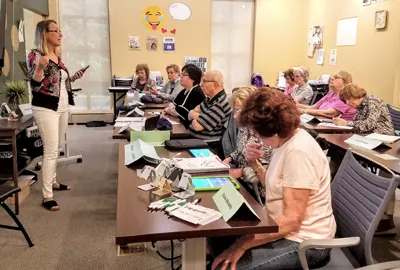
That’s why safety and security are built into every tech class I teach, regardless of the topic. Whether we’re covering social media, smartphones or email, protecting personal information and understanding digital boundaries is always part of the conversation.
From years of teaching, I’ve learned that confidence matters more than technical skill. Best practices include understanding privacy settings, thinking before clicking or sharing, not feeling pressure to respond or engage and taking breaks when needed.
A simple rule I share often: if a platform makes you feel anxious or frustrated more often than informed or connected, it may not be the right fit. And that’s okay.

Which Social Media Platform is Right for Me?
Rather than labeling platforms as “good” or “bad,” I focus on fit and comfort level.
Facebook is often the most approachable platform for older adults because family, friends and community organizations are already there. When I teach Facebook, I frame everything around what I call the 3 P’s: Profile, Privacy and Posting. Understanding those three areas gives people far more control and confidence.
YouTube is another strong option, especially for learning—everything from how‑to videos to lectures, music and entertainment.
Instagram and Pinterest can be enjoyable for visual content, but they tend to be less social and more passive for beginners.
I’m generally more cautious about platforms that rely heavily on fast‑moving, anonymousor highly argumentative content. The truth is, you don’t need to be everywhere—and most people are happier when they’re not.

Navigating AI and Misinformation Online
This topic can feel complicated, especially in a 24‑hour news cycle where information moves quickly and opinions are everywhere. I try to keep this practical and non‑partisan by focusing on skills rather than beliefs.
In my classes, we talk about slowing down before sharing, particularly when content feels urgent, frightening or emotionally charged. I also introduce fact‑checking websites like Snopes and talk openly about how bias exists across news sources, not just on social media.
Some common red flags we discuss include urgent language, extreme emotional framing, screenshots without context or requests for money or personal information.
My rule of thumb is simple: if something triggers a strong emotional reaction, pause. Check another reputable source, look it up on a fact‑checking site, or bring it to a tech class so we can talk it through together. Digital skepticism is a skilland it can truly be learned at any age.
The Myerberg Is Here to Help
This is exactly where the Tech‑Knowledge Hub at the Myerberg Center comes in. We meet older adults where they are, emotionally and technologically,and provide a supportive, non‑judgmental environment for learning.
We offer beginner‑friendly social media classes, one‑on‑one tech help, ongoing guidance around privacy and security and support as platforms and settings evolve.
Our goal isn’t to push anyone onto social media. It’s to help people make informed choices, stay safe, and feel confident using technology on their own terms.
Technology should support your life—not run it.
Subscribe to our newsletter
The Associated is a home for everyone in the Baltimore Jewish community. We offer several email lists to help people find a community, engage with their peers and support Jewish journeys around the world.
Join Our Mailing List





Add Impact to Your Inbox
Sign up for our newsletter
Subscribe to our newsletter
The Associated is a home for everyone in the Baltimore Jewish community. We offer several email lists to help people find a community, engage with their peers and support Jewish journeys around the world.
Join Our Mailing List


 Please Wait while we loading your video.